
3D Printing Cost Calculator – Calculate Real Print Price Instantly
Free & Pro versions for makers, freelancers, and small print services.
How to Calculate 3D Printing Cost (Step-by-Step Guide)
Accurate 3D printing pricing goes beyond filament weight.
If you want consistent, profitable pricing, follow this structured approach.
Step 1: Calculate Material (Filament) Cost
Start with your slicer data.
- Check filament usage in grams.
- Divide spool price by total grams.
- Multiply by the amount used in the print.
Example:
- 1kg PLA spool = $20
- Cost per gram = $0.02
- Print uses 120g
Material cost = $2.40
Material is visible.
But it is rarely the full story.
Step 2: Calculate Electricity Cost
Most FDM printers consume between 0.1–0.3 kWh per hour.
Electricity cost formula:
Print Hours × Power Consumption (kWh) × Electricity Rate
Example:
- Print time: 6 hours
- Power usage: 0.15 kWh
- Electricity rate: $0.20 per kWh
Electricity cost = $0.18
For short prints, this seems small.
For long prints or high electricity regions, it adds up.
(You can also read: How Much Electricity Does a 3D Printer Use?)
Step 3: Estimate Machine Depreciation (Wear & Tear)
Your printer has a lifespan.
If:
- Printer cost = $400
- Estimated lifespan = 2,000 print hours
Cost per hour = $0.20
For a 6-hour print:
Machine wear cost = $1.20
Ignoring depreciation means slowly eating into your profit.
Step 4: Add Maintenance Reserve
Nozzles, belts, build plates, failed prints — they all cost money.
Many professionals add a small fixed reserve per print.
Example:
Maintenance reserve = $0.50 per job
This protects you from unexpected losses.
Step 5: Add Service Fee (Your Expertise)
If you’re printing for clients:
You are not selling plastic. You are selling:
- Setup time
- Experience
- Machine calibration
- Post-processing
Add a service charge that reflects your skill level.
Step 6: Apply Profit Margin
Now calculate your total cost. Then apply margin correctly.
If total cost = $6.50
And you want 30% profit margin:
Correct formula:
Price = Total Cost ÷ (1 − Margin)
So:
$6.50 ÷ 0.70 = $9.28
That protects your real margin.Markup and margin are not the same thing.
Example: 6-Hour PLA Print Cost Breakdown
Here’s how everything adds up:
| Cost Factor | Value | Cost |
|---|---|---|
| Filament (120g) | $0.02/g | $2.40 |
| Electricity | 6 hrs | $0.18 |
| Machine Wear | 6 hrs | $1.20 |
| Maintenance | Fixed reserve | $0.50 |
| Total Cost | $4.28 |
Now apply 30% margin:
Final client price ≈ $6.11
Without calculating properly, you might have charged only $3–4.
Why Under-pricing 3D Prints Kills Small 3D Printing Businesses
Underpricing feels safe. It feels competitive. It feels like you’re helping clients. But in reality, underpricing slowly destroys small 3D printing businesses.
When you price based only on filament weight, you ignore:
- Electricity usage
- Machine wear and depreciation
- Maintenance costs
- Failed print risk
- Your setup and post-processing time
At first, the loss is small. A dollar here. Two dollars there. Over 100 prints, that becomes real money.
Underpricing leads to:
- No profit margin
- Inconsistent income
- Burnout from long print hours
- Clients who expect cheap pricing forever
Worse, once you set a low price, it’s hard to raise it without losing customers. Professional 3D printing services calculate their full operating cost before quoting.
They include:
✔ Material
✔ Electricity
✔ Machine wear
✔ Maintenance reserve
✔ Profit margin
That’s how pricing becomes consistent, repeatable, and sustainable.
If you’re building a small 3D printing business — even as a side hustle — accurate pricing isn’t optional. It’s survival.
The RenderWrench 3D printing cost calculator exists to make that process structured, not emotional.
Price like a business.
Not like a hobby.
Want to automate this calculation? Use the free 3D printing cost calculator here →Link
Free 3D print cost calculator(Stater)
The free version helps you avoid the most common mistake — under pricing based only on filament. It’s ideal for hobbyists and beginners who want a quick, reliable estimate without complexity.
Pro 3D print cost calculator
(For Makers)
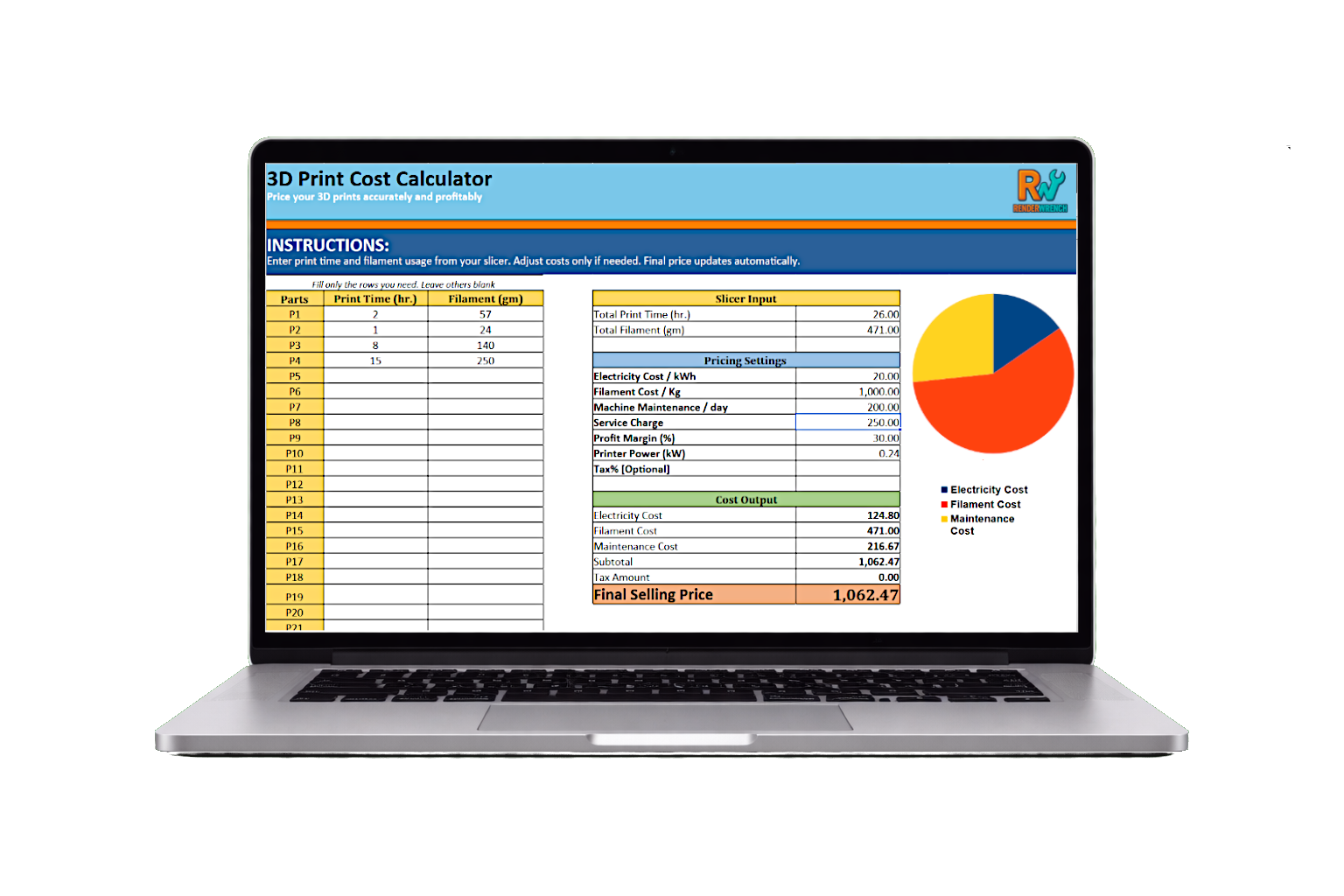
The Pro version is built for makers who sell prints regularly or run a small print service. It gives you full control over pricing by including maintenance, service charges, profit margin, tax, and a visual cost breakdown — so you always know why a print costs what it does.
A 3D printing cost calculator helps you price prints accurately by going beyond filament-only estimates. The RenderWrench 3D Print Cost Calculator uses real slicer data like print time and material usage, then factors in electricity, maintenance, service charges, profit margin, and optional tax to give you a clear and defensible final price. It’s designed for makers, freelancers, and small 3D printing services who want consistent, repeatable pricing without guesswork. You can start with the free version to understand the workflow, and upgrade to the Pro calculator for full control, detailed cost breakdowns, and visual insights. Purchasing the Pro version also directly supports RenderWrench, helping us build more practical tools for the maker and engineering community.
Thank you!
📚 Learn How to Calculate Cost of 3D Printing Like a Professional
The calculator gives you instant results.
But if you want to truly understand how to calculate cost of 3D printing — including electricity, depreciation, maintenance, and pricing strategy — explore our detailed guides below.
These articles break down the logic behind the numbers so you can price confidently and protect your margins.
Recommended Guides:
- 👉 How to Calculate Cost of 3D Printing Per Hour (Complete Breakdown)
- 👉 3D Printing Electricity Usage — Real Power Consumption Explained (coming soon)
- 👉 How to Price 3D Prints for Client Work (Step-by-Step Guide) (coming soon)
- 👉 3D Printing Business Pricing Strategy for Makers (coming soon)
Understanding the math behind your costs turns guessing into strategy.
The calculator gives you numbers.
The guides give you confidence.
Frequently Asked Questions
It depends on electricity rate, machine power draw, and depreciation. For most hobby printers, the real hourly cost ranges between $0.50 and $3 per hour — excluding filament.
No. For long prints, electricity and machine wear can significantly impact total cost.
You calculate total cost first, then apply a percentage margin. The Pro version includes this automatically.
For short prints, it’s small. For 8–12 hour prints, it becomes significant — especially in high electricity regions.
Yes. The Pro version is specifically designed for freelancers and small print services.
Follow RenderWrench on Instagram